Table of contents
Open Table of contents
Command pattern
কমান্ড প্যাটার্নের কাজ হল কমান্ড করা ও কমান্ড undo করা। সিম্পল টেক্সট এডিটর এর কথা
ধরা যেতে পারে যেখানে বোল্ড, আইটেলিক, আন্ডারস্কোর দেয়া যাবে আবার ctrl+z প্রেস
করলে undo হবে । যেহেতু যে অর্ডারে এড হয়েছে তার রিভার্স ওর্ডারে undo করতে হবে তাই
Invoker(যে কমান্ড গুলা এক্সিকিউট করবে এই ক্ষেত্রে TextEditor) এ একটি Stack মেইন্টেইন করা হল।
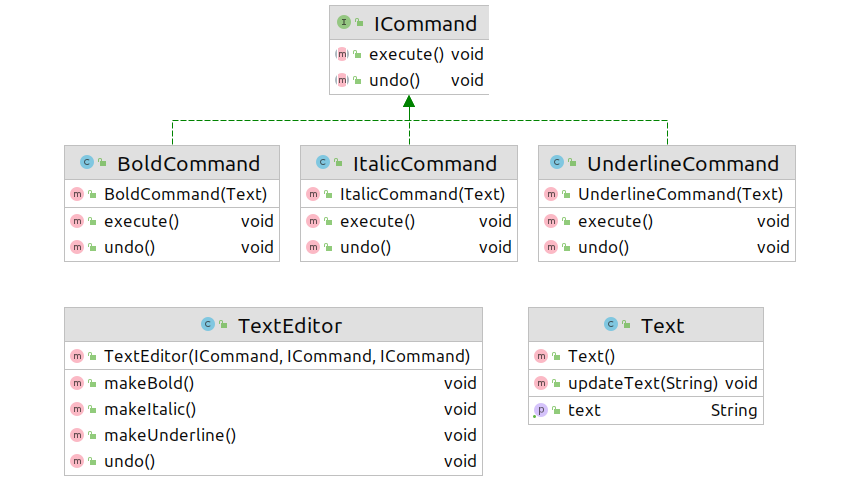 Text (যাকে এডিট করা হবে ডিফারেন্ট কমান্ড দিয়ে):
public class Text {
    private String text;
    public void updateText(String updatedText)
    {
        this.text=updatedText;
    }

    public String getText()
    {
        return text;
    }
}
কমান্ড ইন্টারফেস ,কমান্ড এক্সিকিউট ও আনডু করার জন্যঃ
public interface ICommand {
    void execute();
    void undo();
}
টেক্সট বোল্ড করার কমান্ডঃ
public class BoldCommand implements  ICommand{

    Text text;

    public BoldCommand(Text text)
    {
        this.text= text;
    }

    @Override
    public void execute() {
        text.updateText("<b>"+text.getText()+"</b>");
    }

    @Override
    public void undo() {
        String currentText= text.getText();
        text.updateText(currentText.substring(3,currentText.length()-4));
    }
}
টেক্সট আইটালিক করার কমান্ডঃ
public class ItalicCommand implements ICommand {

    Text text;

    public ItalicCommand(Text text)
   {
    this.text=text;
   }

    @Override
    public void execute() {
        text.updateText("<i>"+text.getText()+"</i>");
    }

    @Override
    public void undo() {
        String currentText= text.getText();
        text.updateText(currentText.substring(3,currentText.length()-4));
    }
}
টেক্সট আন্ডারলাইন করার কমান্ডঃ
public class UnderlineCommand implements ICommand{

    Text text;
    public UnderlineCommand(Text text)
    {
        this.text=text;
    }

    @Override
    public void execute() {
     text.updateText("<u>"+text.getText()+"</u>");
    }

    @Override
    public void undo() {
        String currentText= text.getText();
        text.updateText(currentText.substring(3,currentText.length()-4));
    }
}
টেক্সট এডিটর যেখানে কমান্ড গুলা এক্সিকিউট হবেঃ
public class TextEditor {

    private final ICommand bold;
    private final ICommand italic;
    private final ICommand underline;

    private Stack<ICommand> commands;

    public TextEditor(ICommand bold,ICommand italic,ICommand underline)
    {
        this.bold=bold;
        this.italic=italic;
        this.underline=underline;
        commands= new Stack<>();
    }

    public void makeBold()
    {
        bold.execute();
        commands.push(bold);
    }

    public void makeItalic()
    {
        italic.execute();
        commands.push(italic);
    }

    public void  makeUnderline()
    {
        underline.execute();
        commands.push(underline);
    }

    public void undo()
    {
        commands.pop().undo();
    }
}
মেইন মেথডঃ
public class CommandMain{

    public static void main(String[] args) {

        Text text=new Text();

        ICommand boldCommand= new BoldCommand(text);
        ICommand italicCommand= new ItalicCommand(text);
        ICommand underlineCommand= new UnderlineCommand(text);

        TextEditor textEditor=new TextEditor(boldCommand,italicCommand,underlineCommand);

        text.updateText("Hello World!");

        textEditor.makeUnderline();
        textEditor.makeBold();
        textEditor.makeBold();
        System.out.println(text.getText());

        textEditor.undo();
        System.out.println(text.getText());

        textEditor.undo();
        System.out.println(text.getText());


    }
}
Output:
<b><b><u>Hello World!</u></b></b>
<b><u>Hello World!</u></b>
<u>Hello World!</u>